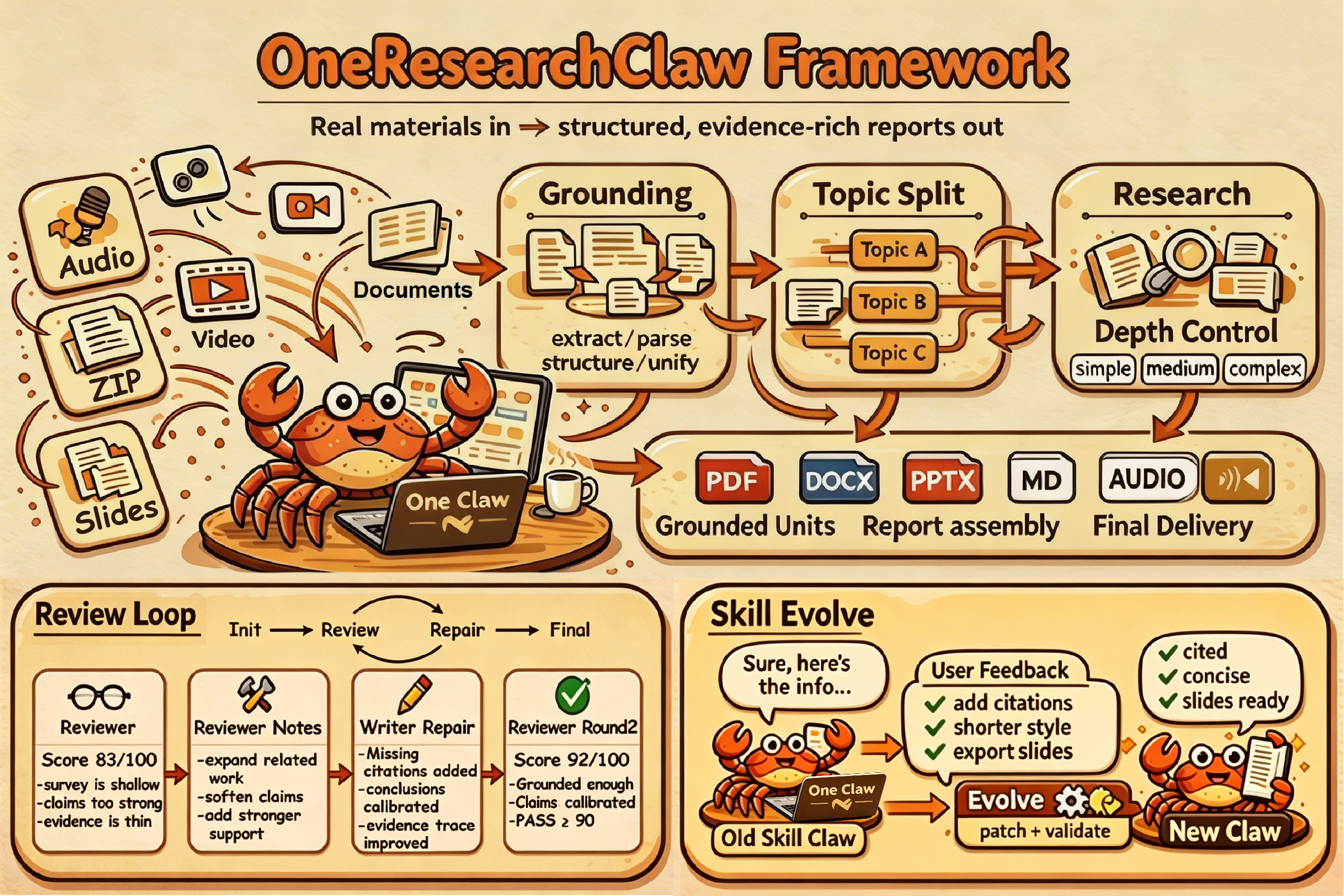
Multi-Format Input → Structured Research Report Generation Pipeline
From meeting audio/video, documents, spreadsheets, and slide decks to cloud links —
automatically structure, research, review, and export everything.
Multi-Format Input → Structured Research Report Generation Pipeline
From meeting audio/video, documents, spreadsheets, and slide decks to cloud links —
automatically structure, research, review, and export everything.
🔥 News
OneResearchClaw now supports continuously evolving skill sets from user feedback and saving personalized preferences as optional derived versions.
Supports arXiv, YouTube, and Bilibili: paste a link to automatically fetch the source material and launch the downstream research flow.
The Review → Rewrite loop supports bounded iterative revision to further improve completeness, reasoning quality, and deliverability in the final report.
Three modes—simple, medium, and complex—make it easier to control literature coverage, the number of opened sources, and overall research cost.
The system can automatically detect multiple discussion threads in a meeting and generate separate reports for each, preserving every line of discussion and analytical branch more completely.
Supports multi-format input → automated research report generation, with one command connecting grounding, research, review, and export end to end.
Core Capabilities
From unified multi-input ingestion to topic split, research, review, export, and skill evolution, OneResearchClaw covers the key capabilities required for a complete research workflow.
Pipeline
From raw input to a deliverable research report, the whole workflow is automated.
Detect whether the input is audio, video, documents, spreadsheets, slide decks, a ZIP mixed-material package, or remote links such as arXiv / YouTube / Bilibili, then route the material to the corresponding grounding workflow. Users always work through a single one-report entrypoint instead of manually switching scripts or preprocessing paths.
Showcase
From multi-topic meeting split to link ingestion, research depth control, the Review → Rewrite loop, and integrated handling of ZIP mixed-material packages, these five cases cover the core workflow capabilities of OneResearchClaw.
OneResearchClaw does more than summarize a meeting. It can split a long meeting into multiple parallel topic branches so each discussion thread gets its own grounded note, research augmentation, and final deliverable report.
OneResearchClaw supports “links as input.” This shows the pipeline is not tied to a single local file upload path: remote papers can enter the same research flow directly and produce reports better suited for reading and delivery.
simple / medium / complex three research depth levels: coverage, the number of opened sources, analysis granularity, and cost can all be explicitly controlled rather than fixed to a single intensity.The same input material and the same reporting task can adjust research intensity through research_mode . Users can make an explicit trade-off between speed and depth based on time budget, token cost, and delivery requirements.
The review loop materially improves structural completeness, evidence specificity, analytical depth, and final delivery quality. In this example, after 3 rounds of repair / rewrite, the report improved from 60 / 100 to 91 / 100 and passed the quality check.
This case shows the pipeline’s full closed loop from multi-source input to bilingual results: materials from different sources are unified into the same report structure, supplemented with necessary external evidence, and then moved into final delivery.
Quick Start
Three steps from raw input to a full research report.
# Send this prompt to the Cursor Agent

Please use the existing `.cursor/skills/one-report/`
skill to generate a full report from one input file.

First read:
- `.cursor/skills/one-report/SKILL.md`

Input:
- input_path: docs/showcase/inputs/case5/HER2-case5.zip
- output_formats: pdf
- research_mode: complex

Search settings:
- search_backend: cursor
- require_open_link: true
- download_opened_literature: true

Optional:
- output_lang: en
- transcription_language: en
Put the file in data/raw_inputs/. Audio, video, documents, spreadsheets, PPT, ZIP mixed packages, and pasted links are all supported.
Read .cursor/skills/one-report/SKILL.md first, then fill in input_path, research_mode, and output_formats following the example.
The agent will automatically execute grounding → research → summary → review → export end to end.
Quick Start Example
Click to expand and inspect the full artifact chain—from HER2-case5.zip to the final Chinese / English PDFs—along with intermediate outputs from each stage.
This is a real Quick Start run: the input is HER2-case5.zip, the research mode is complex, the search backend is cursor, and both require_open_link: true and download_opened_literature: true are enabled.
Recognize the input as a ZIP mixed-material package and record how internal files are routed to different grounding skills.
Convert the multiple materials inside the ZIP into structured content that can be used in the later research / summary / review stages.
Generate candidate queries from the grounded note first, then confirm them before formal retrieval to reduce irrelevant search and token waste.
In complex mode, open sources, save evidence, organize paper notes, and produce a stronger lit.md.
Integrate the grounded note and literature results into a structured summary rather than compressing everything into a few bullet-style takeaways.
Run bounded rounds of revision around coverage, evidence specificity, analytical depth, and deliverability.
Once review passes, the final report is written to research_report.md and exported as Chinese / English PDFs. This lets users inspect the final deliverables while also tracing the full artifact chain.
FAQ
Meeting audio / video, documents, spreadsheets, slide decks, ZIP mixed-material packages, and remote links such as arXiv, YouTube, and Bilibili are supported. The system identifies the input type first and then routes it to the appropriate grounding workflow.
research_mode supports simple / medium / complex. Simple is good for low-cost briefing, medium is a balanced default, and complex fits cases that need broader literature coverage, more opened sources, and deeper analysis.
The base workflow does not require an extra reviewer API. By default it can run through a local / Cursor-side workflow; you only need to provide the optional reviewer_api_config if you want each review round to use an external reviewer.
After report generation, the system enters a review → rewrite loop. The reviewer checks topic alignment, coverage, evidence specificity, analytical depth, structure coherence, and deliverability; the writer revises according to repair actions until the report passes the quality gate or reaches the bounded round limit.
Yes. output_formats supports md / docx / pdf / pptx / audio and comma-separated combinations; output_lang controls the final delivery language, such as Chinese or English.
It turns repeated user feedback into reviewable, verifiable, reusable skill modification proposals, then passes them through patching, regression checks, and version upgrades to form derived skill versions better aligned with personal preferences.
Start from any input format and generate a structurally complete research report today.